
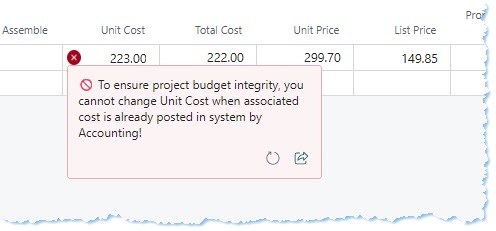
Prevent Editing Posted Costs in Project Planning Lines in Dynamics 365
Maintaining accurate project budgets is critical for organizations using Microsoft Dynamics 365 Business Central. A common challenge arises when project planners inadvertently or intentionally change costs that have already been financially recorded by the accounting team. This can lead to budget inconsistencies, inaccurate reporting, and audit issues. Our new feature ensures that once a cost has been posted, it cannot be edited in project planning lines, maintaining project budget integrity and giving finance teams confidence in the numbers.
🔍 Feature Overview
This feature automatically prevents users from changing Unit Cost on items or resources in project planning lines once the associated cost has been posted in the system by accounting. A clear, user-friendly notification is displayed if an attempt is made to modify a posted cost.
- Prevents accidental or intentional changes to posted costs
- Maintains project budget integrity
- Displays real-time notifications to users attempting edits
- Ensures audit compliance and accurate reporting
👥 Importance for End Users
End users gain clarity and guidance in planning lines by eliminating guesswork or unintentional modifications. The system provides immediate feedback, reducing errors and ensuring that financial approvals remain intact.
- Prevents workflow errors and miscommunication with finance
- Reduces manual reconciliation efforts
- Provides clear guidance via notifications on attempted edits
- Supports consistent project costing practices across teams
📊 Impact on Business Workflow
The feature improves workflow transparency and reduces discrepancies between planning and accounting. It ensures that posted financial data remains authoritative and avoids costly budget miscalculations.
- Minimizes post-entry corrections and disputes
- Supports accurate project reporting for management
- Ensures compliance with internal controls and audits
- Scales across multiple projects without manual oversight
⚙️ Implementation Notes
The feature is implemented via an AL extension in Dynamics 365 Business Central. Key aspects include:
- Upgrade-safe customization, fully tested in sandbox environments
- Triggers validation when a posted cost exists in the database
- User-friendly pop-up message explaining the restriction
- Optional workflow integration with accounting approval channels
📚 Case Study: Project Cost Integrity Implementation
Client Background: A mid-sized engineering firm managing multiple complex projects.
Business Challenge: Planners frequently adjusted costs in project planning lines after posting, causing budget misalignment.
Solution Overview: Implemented a cost-locking feature preventing edits on posted Unit Costs, combined with notifications to inform users.
Implementation Highlights: Extension tested in sandbox, seamless deployment with minimal user training required.
Outcomes & Impact: Reduced post-planning corrections by 95%, increased budget accuracy, improved internal audit confidence.
Consultant’s Role: Led design, AL development, and deployment guidance; provided documentation and training to planners and finance staff.
🛠️ About the Consultant
Nabeel Shahid is a senior Microsoft Business Applications consultant with expertise in Dynamics 365 and Power Platform. He specializes in designing solutions that improve financial control, project management, and operational efficiency. Contact Nabeel to explore tailored solutions for your organization.
Recent Comments