
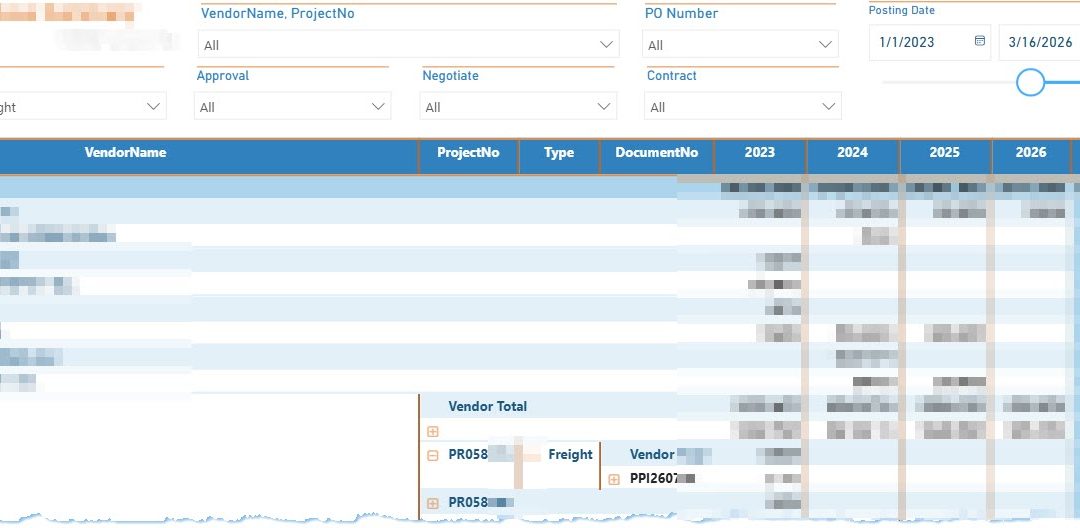
Power BI Vendor Purchase Summary Dashboard Integrating Business Central and Dynamics NAV Data
Organizations running multiple ERP systems often face challenges when analyzing vendor spending across different platforms. In many environments, historical purchasing data may reside in Dynamics NAV (Navision) on-premises servers, while newer transactions are recorded in Microsoft Dynamics 365 Business Central. To solve this visibility gap, a new enhancement integrates posted purchase invoice data from Business Central directly into a Power BI Vendor Purchase Summary dashboard, alongside historical data sourced from Dynamics NAV. This provides a unified, year-over-year view of vendor spending in a single report—helping finance and procurement teams track vendor activity, validate spend, and support approval or negotiation decisions without switching between systems. For additional context on purchase transaction management, see Microsoft Learn: Record Purchases in Business Central.
🔍 Feature Overview
The Vendor Purchase Summary dashboard built in Microsoft Power BI now integrates vendor purchasing data from two ERP environments:
- Posted purchase invoice data from Microsoft Dynamics 365 Business Central
- Historical purchasing records stored in Dynamics NAV (Navision) on-premises
By consolidating data from both systems, the dashboard provides a single analytical view of vendor activity across multiple fiscal years. Procurement teams can analyze vendor spending trends without navigating separate ERP systems or exporting data manually.
The Power BI report structure allows users to drill into vendor spend by vendor name, project number, document number, and purchasing category while comparing yearly totals.
- Year-over-year vendor spend comparison
- Integrated vendor and project level reporting
- Consolidated totals for financial review
- Interactive filters for vendor, project, contract status, and purchasing type
- Unified reporting across NAV and Business Central environments
👥 Importance for End Users
Before this enhancement, finance and procurement teams needed to manually retrieve vendor spending data from both systems. Historical records often required access to the on-premises NAV database, while recent purchases were stored in Business Central.
The Power BI dashboard eliminates this fragmented process by presenting all vendor spend activity in one place.
- Eliminates manual ERP data lookups
- Provides unified reporting across NAV and Business Central
- Accelerates procurement approvals and financial review
- Improves vendor spend transparency
- Simplifies vendor negotiation preparation
📊 Impact on Business Workflow
The integration of Business Central and Dynamics NAV purchasing data within Power BI significantly improves how organizations analyze procurement performance.
Instead of relying on static reports or spreadsheets, stakeholders now access a live dashboard that consolidates vendor transactions from multiple ERP environments.
- Improved procurement decision-making
- Faster vendor spend analysis
- Greater financial transparency
- Better cross-system reporting visibility
- Reduced reliance on manual reporting processes
⚙️ Implementation Notes
The dashboard was implemented using Microsoft Power BI as the reporting platform, enabling advanced data modeling and cross-system integration.
- Data extracted from Business Central posted purchase invoices
- Historical data sourced from Dynamics NAV on-premises SQL database
- Unified Power BI data model for vendor and project analytics
- Year-based aggregation for spend trend analysis
- Interactive filtering and drill-down capabilities
Power BI acts as the central analytics layer, combining data from cloud and on-premises ERP systems while maintaining accurate financial reconciliation with source systems.
📚 Case Study: Cross-ERP Vendor Spend Visibility
Client Background:
A project-driven organization maintained historical purchasing records in Dynamics NAV on-premises while newer financial operations had migrated to Dynamics 365 Business Central.
Business Challenge:
Procurement teams lacked a consolidated view of vendor spend across both systems, requiring manual queries and spreadsheet consolidation for reporting.
Solution Overview:
A Power BI Vendor Purchase Summary dashboard was developed to integrate vendor purchase invoice data from Business Central alongside historical NAV transactions.
Implementation Highlights:
- Power BI data model combining NAV and Business Central datasets
- Vendor and project-level purchasing analysis
- Multi-year spend comparison columns
- Interactive filters for procurement review
Outcomes & Impact:
- Eliminated manual ERP data consolidation
- Improved vendor spending transparency
- Accelerated procurement decision cycles
- Enabled unified cross-system financial analysis
Consultant’s Role:
Designed the Power BI data model, integrated Business Central and NAV purchasing datasets, validated financial accuracy, and delivered a scalable reporting solution for procurement analytics.
🛠️ About the Consultant
Nabeel Shahid is a Microsoft Business Applications consultant specializing in Dynamics 365 Business Central implementations, Power BI analytics, and ERP modernization projects. His work focuses on integrating ERP systems, building scalable reporting solutions, and improving operational visibility across finance, procurement, and project management workflows.
If your organization is running hybrid ERP environments such as Dynamics NAV and Business Central and needs consolidated analytics or Power BI reporting, similar solutions can help unify data visibility and support better decision-making.
Recent Comments