
Project Statistics FactBox in Dynamics 365 Business Central: Track Payments & Budget Instantly
Managing project finances can be complex, especially when it comes to tracking payments, budgets, and actual costs. With the new Project Statistics FactBox enhancement in Dynamics 365 Business Central, project managers and finance teams now have immediate visibility into critical financial metrics directly from the Project Card. This includes calculated Budget, Actuals, Payment Amounts, and a new “Balance Due” field—helping organizations improve cash flow management, reduce manual calculations, and make faster, more informed decisions.
🔍 Feature Overview
The Project Statistics FactBox provides a consolidated view of a project’s financial status right on the Project Card.
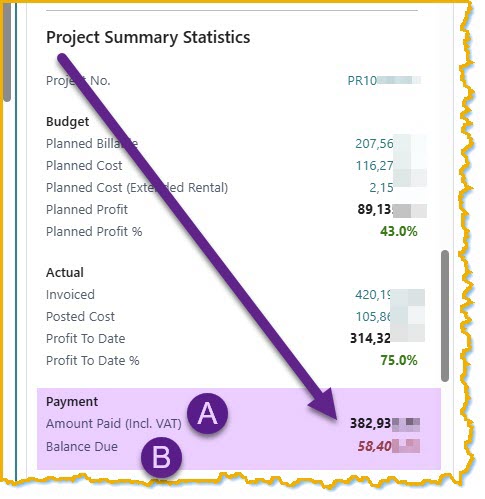
Key additions include:
- Calculated Budget group: Planned Billable, Planned Cost, Planned Profit.
- Calculated Actuals group: Posted Cost, Profit to Date, Invoiced Amount.
- Payment Amount group: Amount Paid (incl. VAT) and Balance Due.
This feature eliminates the need for separate queries or Excel calculations, providing instant financial clarity for each project.
👥 Importance for End Users
For project managers, finance teams, and accountants, having the right data in context is crucial.
The Project Statistics FactBox:
- Enables immediate visibility of unpaid balances.
- Reduces human error in manual calculations.
- Supports accurate, timely billing.
- Improves cash flow monitoring and financial control.
📊 Impact on Business Workflow
The addition of this FactBox has measurable impact across workflows:
- Streamlines project financial review without switching screens.
- Accelerates decision-making on billing and resource allocation.
- Increases accuracy in profit reporting and cash flow forecasting.
- Scales easily across multiple projects or jobs within Business Central.
⚙️ Implementation Notes
The Project Statistics FactBox is implemented as an AL extension, ensuring it is upgrade-safe and sandbox-tested.
Key technical points include:
- Integrated directly on the Project/Job Card for immediate visibility.
- Calculated fields for Budget, Actuals, and Payments using standard BC ledger tables.
- Supports Amount Paid (incl. VAT) and Balance Due for accurate cash flow tracking.
- Minimal performance impact, designed for multi-project environments.
📚 Case Study: Project Alpha
Client Background: A mid-sized construction firm managing multiple projects simultaneously.
Business Challenge: Project managers lacked immediate insight into unpaid invoices, causing delayed collections and cash flow bottlenecks.
Solution Overview: Implemented the Project Statistics FactBox with Budget, Actuals, and Payment Amount groups on all active Project Cards.
Implementation Highlights: AL extension deployment, sandbox testing, and integration with existing project ledger tables.
Outcomes & Impact: Real-time visibility of Amount Paid and Balance Due improved collection efficiency by 25% and reduced billing errors significantly.
Consultant’s Role: Designed the extension, validated calculations, and trained the client’s finance and project management teams on effective usage.
🛠️ About the Consultant
Nabeel Shahid is a senior Microsoft Business Applications consultant specializing in Dynamics 365 Business Central and Power Platform implementations.
By combining technical expertise with real-world business insights, Nabeel helps organizations optimize workflows, improve financial visibility, and achieve scalable project management. Connect with Nabeel to explore how your projects can benefit from advanced FactBox insights.
Recent Comments