
🚫 Hold Invoice Feature for Business Central Projects – Prevent Billing Errors Before They Happen
In many project‑driven organizations, timing is everything—especially when it comes to client invoicing. During a recent Business Central enhancement, we introduced a custom “HOLD Invoice” toggle for sub‑projects, giving Accounting a clear signal that invoices must not be released until Client Services has formally approved communication with the customer.
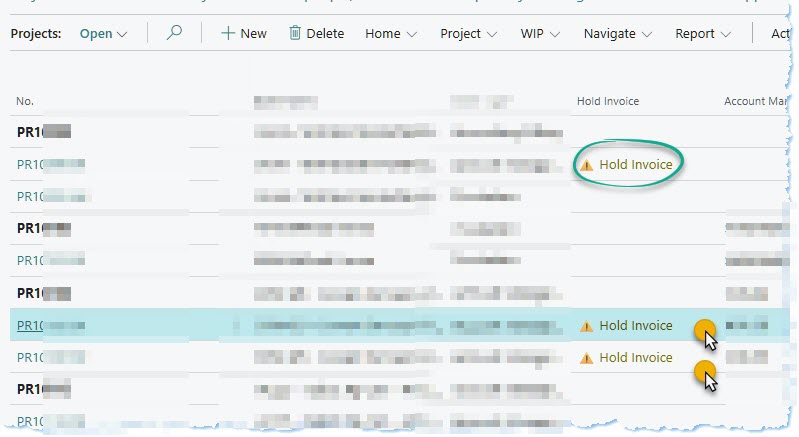
This upgrade‑safe extension not only reduces billing mistakes but also adds visual clarity directly within the project list, as shown in the screenshot.
Learn more about project billing configuration on the official Microsoft documentation here:
Business Central – Project Management.
📘 Table of Contents
🔍 Feature Overview
The new HOLD Invoice toggle provides Accounting a reliable indication that a project or sub‑project requires internal review before billing continues.
Once activated, it prevents premature invoicing and triggers a workflow expectation: Accounting must contact the Client Services team prior to sending any documents to the customer.
This safeguard appears directly on the project list using a visible icon and label—making it easily spotted during daily operations.
- Simple toggle within the project details (or sub‑project card).
- Visual indicator displayed directly in project list pages.
- Ensures Accounting checks with Client Services.
- Reduces risk of sending invoices before contractual readiness.
- Fully upgrade‑safe AL extension.
👥 Importance for End Users
End users—from Project Managers to Accounting—benefit from streamlined communication and reduced administrative follow‑ups.
The HOLD Invoice indicator creates transparency across departments, ensuring nobody accidentally triggers billing activities too early.
- Reduces miscommunication between Client Services and Accounting.
- Minimizes invoice reversals caused by early billing.
- Allows project stakeholders to quickly see which jobs are on hold.
- Makes multi‑sub‑project environments far easier to manage.
📊 Impact on Business Workflow
Before this enhancement, Accounting often depended on email threads or verbal updates to know when certain clients should or shouldn’t receive invoices.
Now, this status is embedded directly in Business Central—visible and actionable.
Teams experience fewer delays and fewer exceptions, and executives gain more confidence in the billing process.
- Improves billing accuracy across the entire Accounting cycle.
- Standardizes communication around invoice readiness.
- Reduces downstream corrections and internal escalations.
- Provides clear visibility during month‑end cycles.
⚙️ Implementation Notes
The HOLD Invoice toggle is implemented as a Business Central AL extension, ensuring upgrade‑safe maintainability and clean separation from base code.
Tested thoroughly in a sandbox environment, it integrates seamlessly with existing project pages and list views.
- Custom field + control added to the Project and Sub‑project pages.
- Boolean status surfaced visually in project lists.
- Optional event‑based triggers for workflow expansion.
- No core system modifications—100% extension‑based.
📚 Case Study: Hold Invoice Control for Multi‑Stage Projects
Client Background: A national event management organization handling hundreds of concurrent projects, each with multiple sub‑projects requiring different billing timings.
Business Challenge: Accounting occasionally released invoices before Client Services finalized timing with event sponsors—leading to confusion, corrections, and customer dissatisfaction.
Solution Overview: Implemented a HOLD Invoice toggle tied to sub‑projects, with the status surfaced in the project list for real‑time visibility.
Implementation Highlights: Built using AL, added conditional icons, and established internal workflow expectations without locking normal functionality.
Outcomes & Impact: Billing accuracy improved, project communication standardized, and unnecessary invoice reversals dropped substantially.
Consultant’s Role: Designed the functional approach, delivered the AL extension, configured views, and trained Accounting & Client Services teams.
🛠️ About the Consultant
This enhancement was designed and implemented by Nabeel Shahid, a senior Microsoft Business Applications consultant specializing in Business Central, Power Platform automation, and process optimization.
If your organization needs custom workflow controls, visibility enhancements, or optimized project accounting, feel free to reach out https://nabeelshahid.com/contact/
“
Recent Comments