
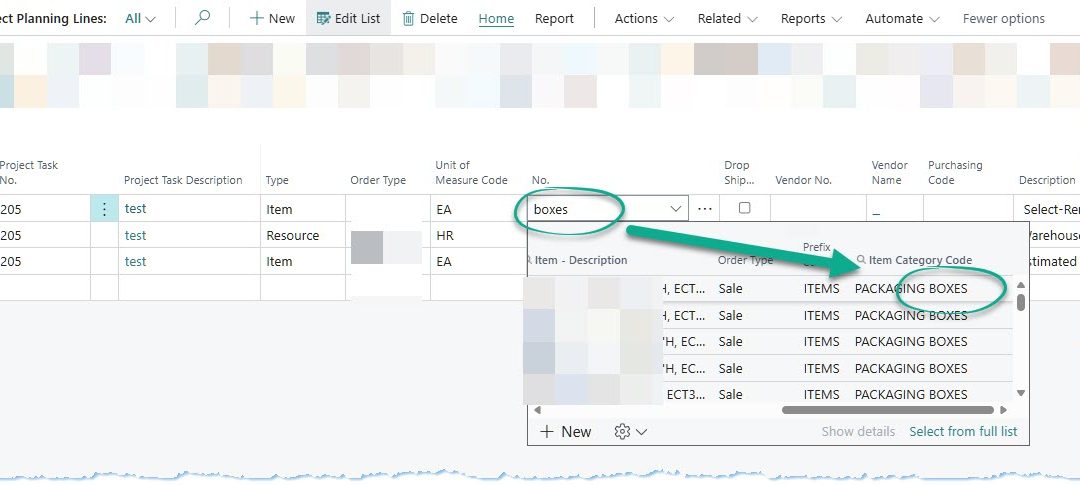
🚀 Item Lookup Enhancement in Dynamics 365 Business Central for Faster Production & Project Planning
Managing large catalogs in production or project planning can be challenging. Users often scroll through hundreds of items with similar names, causing delays and errors. To address this, we enhanced the Item Lookup List in Microsoft Dynamics 365 Business Central by adding the Item Category Code as a searchable column. ✅ This makes it easier for planners to quickly filter, identify, and select items accurately. Learn more: Microsoft Docs – Business Central Overview.
🔍 Feature Overview
The Item Category Code is now part of the lookup list, enabling planners to filter items by category seamlessly. Key benefits include:
- 🔹 Sort and filter items efficiently
- 🔹 Quickly search without leaving the current planning screen
- 🔹 Reduce selection errors for similar items
Implemented as an upgrade-safe AL extension, it integrates seamlessly with Business Central tables and Power Platform flows. Reference: AL Development Overview.
👥 Importance for End Users
This feature enhances productivity for planners and project managers by:
- ⚡ Faster and more accurate item selection
- ✅ Fewer errors and more reliable scheduling
- 📈 Improved consistency across production processes
- 🧩 Minimal training required due to intuitive interface
More info: Lookup Pages.
📊 Impact on Business Workflow
Improved item selection impacts the organization as a whole:
- ⏱️ Faster BOM and project planning cycles
- 💡 Reduced rework and operational risks
- 📊 Enhanced visibility into inventory selection
- 🌱 Scales efficiently with catalog growth
Best practices: Microsoft Learn – Business Central Training.
⚙️ Implementation Notes
The AL extension is upgrade-safe and fully integrated with Power Platform APIs. Implementation highlights:
- ✅ Item Category Code added for seamless filtering
- 🧪 Tested in sandbox & production environments
- 📜 Logging and error handling for maintainability
- 🔄 Compatible with existing workflows
RBAC, environment isolation, and traceable automation flows ensure compliance and governance.
📚 Case Study: Streamlining BOM Selection
Client Background: Mid-sized manufacturer managing 3,000+ items, facing selection errors.
Business Challenge: Planners spent significant time scrolling, causing delays and inconsistencies.
Solution Overview: Added searchable Item Category Code to Business Central lookup list.
Implementation Highlights: Upgrade-safe AL extension integrated with Power Automate, sandbox-tested, with logging and error handling.
Outcomes & Impact: Reduced BOM prep time by 30%, lowered errors by 40%, improved consistency.
Consultant’s Role: Designed extension, oversaw testing, ensured compliance, and guided end-user adoption.
🛠️ About the Consultant
I am an independent Microsoft Business Applications consultant helping enterprises and SaaS organizations close the gap between standard Dynamics 365 capabilities and operational requirements. I specialize in upgrade-safe customizations across Business Central, Power Platform, and CRM, focusing on governance, scalability, and maintainability. For more details, visit nabeelshahid.com.
Recent Comments